Hi!
I’m working on test automation where the viewport containing the elements is an SVG. To find elements that aren’t in view, I need to move this viewport.
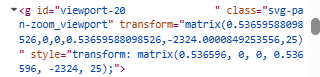
In the image we can see the transform attribute with the coordinate matrix that changes when the viewport is moved. Using Robot Framework, I need to move the viewport to access elements that aren’t visible. With the default functions “Click” or “Hover”, the viewport automatically pans and centers the element, but this only happens if part of that element was already visible in the viewport; if it’s completely out of view, it founds them, but doesn’t center the view and they remain unclickeable.
The errors displayed are:
8 × waiting for element to be visible, enabled and stable
- element is visible, enabled and stable
- scrolling into view if needed
- done scrolling
- element is outside of the viewport
- retrying click action
- waiting 500ms
The scrolling into view never happens. What solutions are there for this?
Thank you so much!