AI Translation (added by Markus):
Hello, good afternoon.
I have a question and would like to ask for some help.
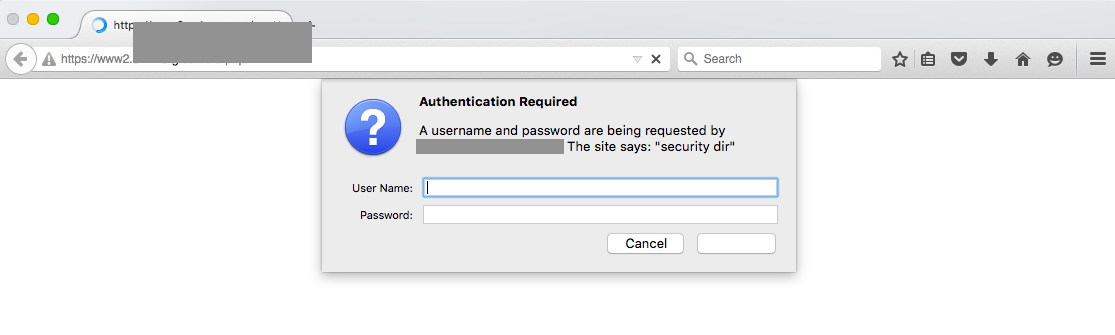
I am performing a test automation using Robot with the SeleniumLibrary on a web system. The login screen of this system is a JavaScript alert coming from the server and is not part of the page’s DOM.To perform the login, I use Python to simulate keyboard events, and for it to type the username and password, the browser needs to be open.
Is there any way to run this automation in the background in Robot?
Can you give me any suggestions?I searched for some situations on the internet, but none of them worked for me.
One of them was adding the lineoptions.add_argument("--headless")to my class that interacts with the browser when filling out the login fields.
However, it couldn’t detect the fields in that mode, and errors occurred.
Original
Olá, boa tarde.
Estou com uma dúvida e gostaria de pedir um auxilio.
Estou ralizando uma automação de teste com o Robot utilizando a SeleniumLibrary de um sistema web. A tela de login deste sistema é um alert javascript que vem do servidor e não está no DOM da página.Para realizar o login eu utilizado o python para simular eventos do teclado e, para que ele digite user e senha o browser precisa estar aberto. Existe alguma forma para que eu consiga rodar essa automação em backgroud no Robot? Conseguem me dar alguma dica?
Pesquisei algumas situações na internet, porém nenhuma delas me atendeu.
Uma delas foi adicionar a notação options.add_argument(“–headless”) na minha classe que faz interação com o browser no preenchimento dos campos de login, porém ele não conseguiu ver os campos e ocorreu erros.