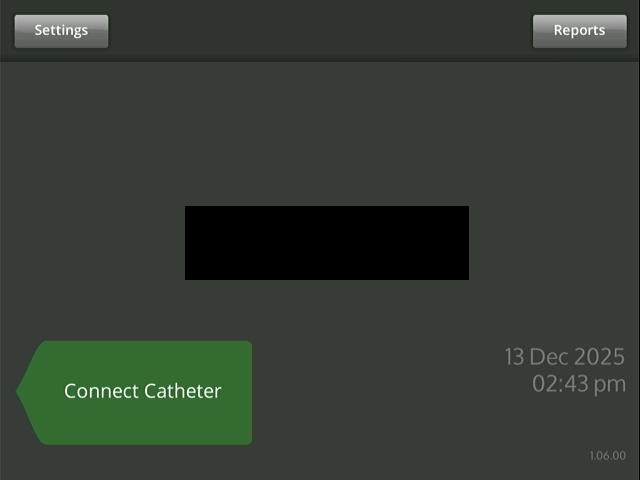
I am trying to automate a really old embedded system by connecting it through DVI port - HDMI - HDMI grabber device - USB on laptop. This physical connection allows us to replicate the device visual on my laptop and I then use OpenCV to capture screen and implement certain flows using image comparison with golden copies.
One of the challenges with this approach, is that most of the screens have date-time on them, so the image comparison fails with most of the libraries. I found this library - robotframework-imagecompare · PyPI but seems its not maintained anymore - gives errors upon installation.
Anybody has any suggestion how could we mask certain areas in image comparison? I dont want to use Confidence Level on image comparison, as that could lead to other non matching areas to be left out - I just want certain fixed areas to be excluded from comparison.
The Compare Images keyword might fit your need, by using .json or defined masks.
Personaly I use with images and pdf, either with fixed position masks or regex masks for date and time.
In your case a 0 threshold will not allow differences as you need.
One option would be setting the date and time area e.g. black before comparison.
Or divide the image into separate parts and compare those and omit the part containing date and time.
Thanks for the suggestion - yes, this seems like a feasible solution. I was trying it but cannot get the mask configuration right - could you suggest how did you provide the regex for the date and time masking?
Note that there are parameters also for text recognition such as ocr_engine or force_ocr that you can tune depending of your case.
You’ll see in my case that second pattern include “pattern”: "[0-9O] with “O” letter as sometimes my clearer 0 might be mismatched.
Thanks Charlie for the examples. Unfortunately I have been trying to create the regex but havent been able to crack it yet. So, in my image, I have the following 2 strings that I need to mask - 23 Dec 2025 and 12:45 PM. So, it would be dd mmm yyyy and hh:mm A/PM.
The regex I have tried are :
\\d{2}.* - this matches and masks 23 and 2025 in the result but not the time numbers
\d{2}.[A-Z][a-z]{2}.\d{4} - doesnt match anything
[0-9]{2}\/s[A-Z][a-z]{2}\/s[0-9]{4} - doesnt match anything.
I have been trying these regex on online validators, and they seem to work, but not when used within the json. Am sure there I am missing something basic..would be really helpful if you could review?
Thanks. I can check tomorrow on my side.
Eventually a fixed area could work for you as you mentioned in your first post?
Can you try also this with your file:
${text} Get Text From Document ${yourfile}
To see if the OCR gets properly the text from your original image.
I tried with the image provided (which might not have the better or true resolution), and I doesn’t return text… (the function behind keyword is the same as used when comparing images).
It might be possible that tesseract has some trouble to read the brighter text on a dark background. But it is strange that no text at all is returned via “Get Text From Document”
I tried to read texts on the image captured_image_5 above with my system. I am using EasyOcr for reading and the results are as follows:
Just EasyOcr:
‘Settings’, conf=0.9997512742187975
‘Reports’, conf=0.9991504261668096
‘13 Dec 2025’, conf=0.7625404404937346
‘Connect Catheter’, conf=0.9998831862591471
‘01.50 pm’, conf=0.9608864063301853
‘106 00’, conf=0.7169672117082454
Increase image resolution x4:
Superresolution x4 and EasyOcr:
‘Settings’, conf=0.9999535115784948
‘Reports’, conf=0.9858615869419313
‘13 Dec 2025’, conf=0.9448881080672479
‘Connect Catheter’, conf=0.9994978053452113
‘01.50 pm’, conf=0.9969433023287747
‘1.06.00’, conf=0.9950127912399211
EasyOcr does some image improvements before reading the texts and it did a quite good job here. (Well, a colon in the time 01:50 is misread as dot.)
So based on that I would guess that tesseract also needs some image improvements before reading.
In some cases, depending on font renderer (varies from os to os), in the past ive also done convert to black and white image to get rid off font’s anti-aliasing ..